Moving business logic out of react
Working with React in very large codebases during the years led me to ask myself so many times:
“How can I organize things better? How do I properly separate concerns?”
I’ve always been a big fan and promoter of simplicity. My first goal is to make users happy, solve their problems and do it fast. Then, once I have a working product, I must take some time to think how can I continue to be fast.
React gave me the simplicity, no strict guidelines, it just worked. I really loved the fact that you can write things in every form you feel is good at that moment and it just worked. But month after month, refactor after refactor, I’ve often found myself in the position of saying:
“What was I thinking? That’s obviously not good”
“Maybe OOP guys were right all of the time…”
As a strong believer in my own ideas and really a stubborn person, this was very difficult to accept for me. But as I like to say: “Il tempo è galantuomo (Time is a gentleman)”.
Becoming a bit more serious, I experimented with a lot of things, tried, retried and finally I’ve reached a point where I think I can share something useful. I did it with my team at Golee first as an ADR, and then here as a article.
Separating Concerns: A Look at Side Effects in React
Managing side effects is one of the biggest challenges in any non-trivial React application. While fetching data, mutations, and local state management are the primary responsibilities of a component, putting them all together creates a tightly coupled mess. The complexity often begins when data fetching logic, which is inherently asynchronous and involves managing loading, error, and success states, is placed directly inside UI components.
The following section outlines the common pitfalls of this pattern and proposes a standardized architecture for separating these concerns.
The Problem with Business Logic in Components
A lot of components become cluttered with data fetching logic, making them hard to test, difficult to reuse, and prone to bugs. The classic imperative approach using useEffect, useState, and inline service calls forces developers to manually handle loading, error, and success states:
const BadComponent = () => {
  const [data, setData] = useState()
  const [isLoading, setIsLoading] = useState(false)

  const fetchData = async () => {
    setIsLoading(true)
    try {
      const response = await someFetchingFunction()
      setData(response.data)
    } catch (err) {
      // handle error
    } finally {
      setIsLoading(false)
    }
  }

  useEffect(() => {
    fetchData()
  }, [])

  return isLoading ? <div>Loading...</div> : <div>{data}</div>
}
This pattern introduces:
- Race conditions and stale state: Updating loading and data states separately creates timing issues.
- Inconsistent patterns: Every developer handles loading/error states differently.
- Testing complexity: Need to mock API calls and manage complex state scenarios.
- Tight coupling: Business logic is entangled with UI components.
In the past, we attempted to build some internal solutions including a custom useApi() hook and an internal event bus for query invalidation (detailed in the background section below), but these custom abstractions were non-standard, error-prone, and lacked the robustness of established solutions.
The Proposed Architecture: Layered Separation with TanStack Query
A highly effective solution is to adopt on TanStack Query with a pragmatic layered architecture that scales from simple to complex use cases. This approach allows to cleanly separate concerns while avoiding over-engineering, as this library provides useQuery and useMutation hooks that act as powerful adapters between React components and the data/business logic layers.
Architecture Layers
This model cleanly separates concerns while avoiding over-engineering:
- Data Fetching Layer: Pure I/O functions that handle API communication and can be completely framework-agnostic.
- Business Logic Layer: Handles data transformation, composition, and core side effects (e.g., complex calculations, analytics). This layer can also be framework-agnostic.
- React Adapter Layer: TanStack Query hooks (
useQuery,useMutation) that connect business logic to React components. - Component Layer: UI components that use adapter hooks for rendering and handle only UI-specific side effects.
Implementation Examples
Example 1: Simple Data Fetching
For simple cases, the business logic layer can be skipped entirely, connecting the data layer directly to the React adapter.
// --------------------------------------------------------
// Data layer
// --------------------------------------------------------
function getOperations(params: { orgPersonId: string }) {
  return apiClient('financial').get<Operation[]>('operations', { params })
}

// --------------------------------------------------------
// React adapter layer
// --------------------------------------------------------
function useOperations(orgPersonId: string) {
  return useQuery({
    queryKey: ['operations', orgPersonId],
    queryFn: () => getOperations({ orgPersonId })
  })
}

// --------------------------------------------------------
// Component layer (UI)
// --------------------------------------------------------
const OperationsList = (props: { orgPersonId: string }) => {
  const { data, error, isPending } = useOperations(props.orgPersonId)
  // Do whatever you want in the render
}
Example 2: Complex Mutation with Business Logic
For complex scenarios, the business logic layer handles data processing and non-UI side effects, abstracting them away from the component.
// --------------------------------------------------------
// Data layer (framework-agnostic)
// --------------------------------------------------------
function getOperations(params: { orgPersonId: string }) {
  return apiClient("financial").get<Operation[]>("operations", { params });
}

function applyDiscount(
  operationIds: string[],
  discountId: string
) {
  return apiClient("financial").post<void>("discounts/apply", {
    operationIds,
    discountId,
  });
}

// --------------------------------------------------------
// Business logic layer (framework-agnostic)
// --------------------------------------------------------
async function getAppliedDiscountsByOrgPerson(orgPersonId: string) {
  const response = await getOperations({ orgPersonId });

  return response.data.reduce((acc: Discount[], operation) => {
    const discount = operation.appliedDiscount?.discount;

    if (discount && !acc.some((d) => d.id === discount.id)) {
      acc.push(discount);
    }
    return acc;
  }, []);
}

async function applyDiscountToOperation(
  operationId: string,
  discountId: string
) {
  await applyDiscount([operationId], discountId);

  // Example of additional needed action (Business Side Effect)
  await hermes.sendNotification({
    type: "DISCOUNT_APPLIED",
    operationId,
  });
}

// --------------------------------------------------------
// React adapter layer (Mutation hook with business logic side effects)
// --------------------------------------------------------
function useApplyDiscountMutation(callbacks: MutationCallbacks) {
  const queryClient = useQueryClient();

  return useMutation({
    mutationFn: (variables: { operationId: string; discountId: string }) => {
      // Calls the framework-agnostic business logic function
      applyDiscountToOperation(variables.operationId, variables.discountId);
    },
    ...callbacks,
    onSuccess: (data, variables) => {
      // Business logic: Invalidate queries and trigger analytics
      queryClient.invalidateQueries({ queryKey: ["applied-discounts"] });
      queryClient.invalidateQueries({ queryKey: ["operations"] });
      trackEvent(`discount.applied`);

      ...callbacks.onSuccess(data, variables);
    },
  });
};

// --------------------------------------------------------
// Component layer (UI)
// --------------------------------------------------------
function ApplyDiscountButton(props: {
  operation: Operation;
  discount: Discount;
}) {
  // The component only defines UI-specific side effects in callbacks
  const { mutate, isPending, error } = useApplyDiscountMutation({
    onSuccess: () => {
      // UI side effect: Show a success toast or perform other UI actions
      toast.success(`Discount applied to ${props.operation.name}`);
    },
    onError: (err) => {
      // UI side effect: Show an error toast
      toast.error(`Failed to apply discount: ${err.message}`);
    },
  });

  return (
    <button onClick={() => mutate(props.operation, props.discount)}>
      {isPending ? `Applying...` : `Apply discount: ${props.discount.name}`}
    </button>
  );
};
Strategy for Errors and Side Effects
Error Handling Strategy
To leverage TanStack Query’s built-in error management, the data layer and the business logic layer must throw errors, not catch them. This allows the React adapter layer (the hook) to catch and handle them gracefully. From there, the component can consume the error state (isError, error) and implement specific UI error feedback.
Mutation Side Effect Strategy
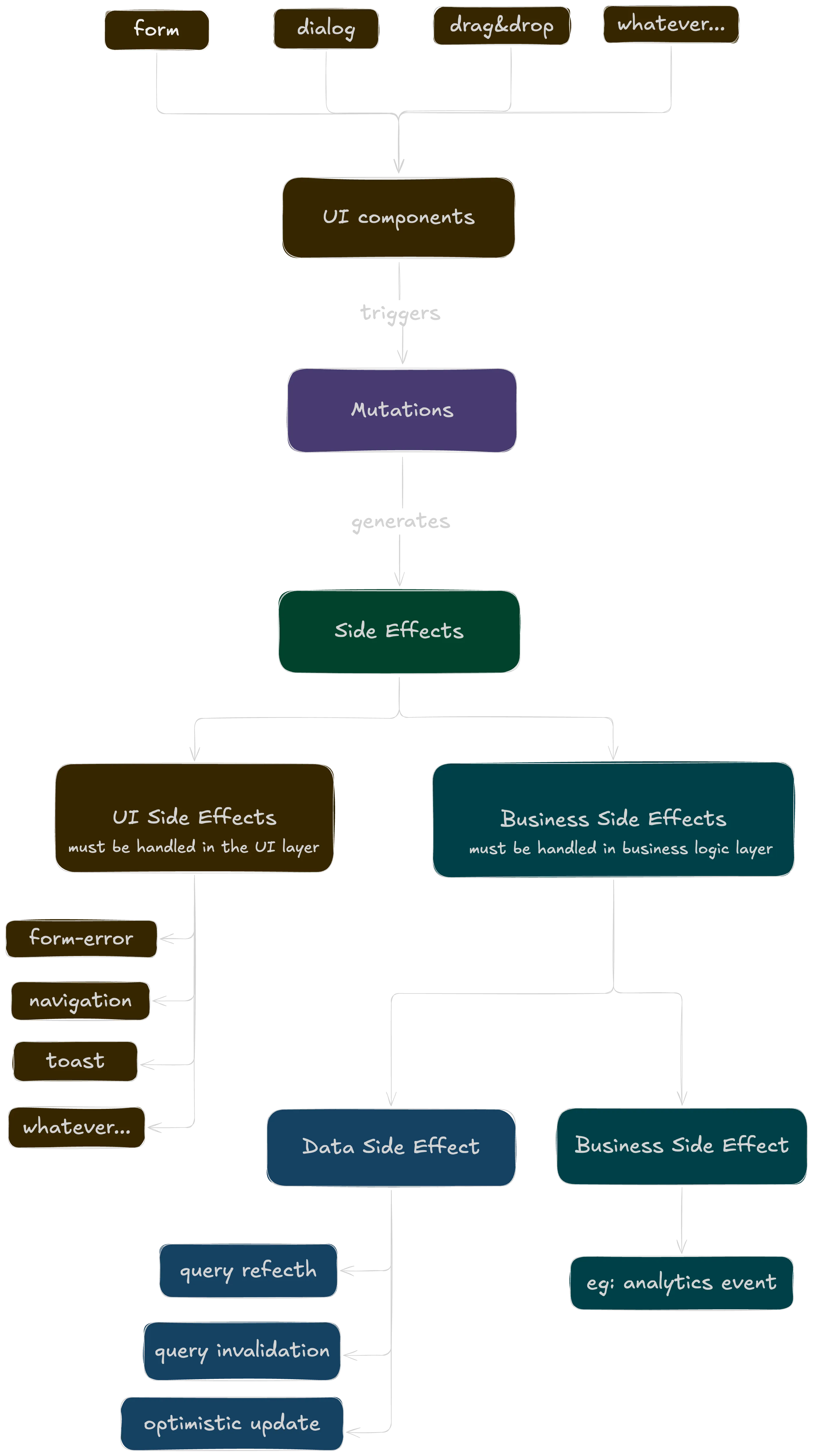
A clear separation must be adopted between business logic side effects and UI-specific side effects:
- Business Logic Side Effects (e.g., query invalidation, analytics tracking, logging) are encapsulated within the custom
useMutationhook. These actions are standardized and do not depend on the specific UI component using the mutation. - UI-Specific Side Effects (e.g., showing toasts, closing modals, redirecting the user) are passed as callbacks (
onSuccess,onError) from the consuming component. This gives the component full control over its presentation logic.
Visually, this decision can be represented by the following chart:
Testing and Outcomes
Testing Strategy
This architecture significantly simplifies testing:
- API functions: Mock HTTP calls (eg: using msw).
- Business logic: Pure function tests, easy to test in isolation.
- Hooks: Use @testing-library/react-hooks and a query client wrapper.
- Components: Mock the hooks if needed, test just UI behavior.
Benefits of the Layered Approach
- Strong Separation of Concerns: Business logic is decoupled from UI components.
- Reusability: Business logic can be reused across different contexts.
- Consistency: Standardized patterns across the entire codebase.
- Better caching: Automatic request deduplication and intelligent cache management.
- Improved Dev Ex: Built-in loading states, error handling, and excellent devtools.
- Easier Testing: Pure functions can be tested in isolation without React dependencies.
- Flexible UI Feedback: Components can provide context-specific feedback for the same mutation.
Tradeoffs to Consider
- Query key management: Developers must be careful with query key consistency and invalidation to prevent bugs.
- Initial Verbosity: The initial code for a mutation and its consuming component may be slightly more verbose compared to encapsulating everything in one place, but this is a worthwhile cost for long-term maintainability.
Background: Previous Solutions Attempted
Understanding our journey helps contextualize why this layered architecture is the right choice.
We initially attempted to solve these issues with a custom useApi() hook that abstracted some state handling. While this was an improvement over raw useEffect patterns, it had a critical limitation: it didn’t handle stale state properly. Updating loading and data states separately (e.g., setIsLoading(true) → setData(data)) introduced race conditions and layout shift flickers, especially with fast or concurrent re-renders.
For mutations, the situation was even worse. We had no standardized abstraction. Mutations were done by directly calling service functions or making HTTP requests from components. This made it difficult to manage loading states, error handling, and post-mutation updates consistently.
We attempted to solve query invalidation by building a lightweight internal event bus, essentially a simplified version of our Eywa service. Components could subscribe to events (e.g., OperationUpdated), and certain actions would publish those events, triggering refetching. While clever, this approach was non-standard, error-prone, and lacked observability.
Building these custom abstractions wasn’t a waste of time. It gave us deep understanding of the responsibilities and edge cases that TanStack Query handles elegantly. However, maintaining custom solutions for problems that have been solved by the community diverts resources from our core business logic.